Vessel Information
Vessel Information
The Ships search allows you to search for and view vessel information stored in the NEMO Vessel Information Service.
The NEMO Vessel Information Service stores permanent vessel information, such as vessel identifiers, general and technical information, ice class information, certificates, and active exemptions. The information is primarily derived from data submitted for vessel port calls. The data is mainly maintained through the SID, SHP, CRT and NOA notifications.
Updating Information in the NEMO Vessel Information Service:
- Only a submitted notification updates vessel information stored in the NEMO Vessel Information Service. Notifications in Draft status do not update information.
- If a new value for the same information is submitted later, the most recently submitted value remains valid.
- If a submitted notification is subsequently cancelled, information already stored in the Vessel Information Service is not removed automatically. Correct incorrect information by submitting a new notification with the correct data.
Searching for a Vessel and Viewing Vessel Information
You can access the Ships search from the Ships option in the main menu.
- Search for a vessel using one of the following:
- vessel name
- IMO number
- MMSI number
- call sign
- other vessel identifier (Traficom ID)
If the vessel is a barge, use the other vessel identifier (Traficom ID).
- Select the vessel from the search results to open the vessel information view.
If the vessel cannot be found in the NEMO Vessel Information Service, it must be added to NEMO before notifications related to port calls can be submitted. New vessels can only be added through the user interface.
For detailed instructions, see section 3.1 Port Calls.
Vessel Information View
In the vessel information view, you can examine the information stored for the vessel and its current status.
The information displayed is primarily created and updated based on notifications submitted for the vessel's port calls.
If you notice missing or incorrect information, update it by submitting the notification used to maintain that information. Vessel information cannot be updated directly in the vessel information view.
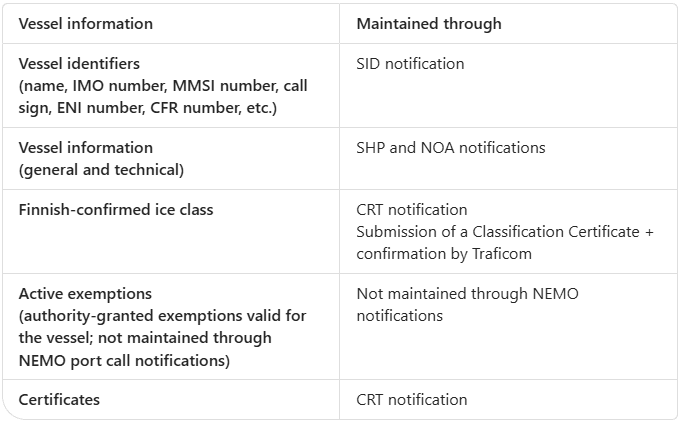
Active exemptions are not maintained through NEMO notifications. The information is transferred to NEMO from EU systems based on exemptions granted by competent authorities.
Read more in the Active Exemptions section.
Finnish-Confirmed Ice Class and How It Differs from the Vessel's Ice Class
NEMO displays two different ice class values:
- Finnish-confirmed ice class
- Vessel ice class
Although these values may contain the same ice class code (for example, IA or IA Super), they are not the same thing.
Finnish-Confirmed Ice Class
The Finnish-confirmed ice class is the ice class confirmed by the Finnish Transport and Communications Agency Traficom. It affects the amount of fairway dues and the vessel's eligibility for icebreaker assistance.
For detailed instructions, see section 3.1 Port Calls.
Go to the CRT instructionsOpens in a new tab
Vessel Ice Class
The vessel ice class is the ice class or class notation assigned by the vessel's classification society. It is reported in the SHP notification in the Ice Class (DE-009-03) field.
Go to the SHP instructionsOpens in a new tab
This information serves as the basis for determining the Finnish-confirmed ice class, but it does not by itself affect the amount of fairway dues or eligibility for icebreaker assistance.
When a port call is created in NEMO, the vessel's Finnish-confirmed ice class is displayed. Both ice class values are visible in the vessel information view.
Vessel Certificates
In the Certificates section, the key certificates stored for the vessel are displayed as cards.
Certificates include:
- Tonnage Certificate
- Certificate of Nationality
- Classification Certificate
- Load Line Certificate
- Safety Certificate
- Other Certificate
Only certificates relevant to Finland are displayed in the view. Use the certificate type Other Certificate when submitting a certificate other than those listed above.
Certificate information is maintained using the CRT notification submitted for the vessel's port call.
If no certificate information has been stored in the NEMO Vessel Information Service or the certificate has not been reported via a CRT notification, the certificate card is displayed as empty.
The certificate card displays:
- issue date
- expiry date
- issuing authority
- issuing authority flag state
- issuing authority name
- description
By selecting a certificate card, you can view more detailed certificate information.
Vessel Exemptions
The Active Exemptions section contains exemptions currently valid for the vessel and granted by competent authorities.
Exemptions are not maintained through port call notifications and do not require any action by users. The information is transferred to NEMO from EU systems on the basis of exemptions granted by authorities.
Exemption information cannot be queried, modified or deleted through NEMO notifications. If you suspect an error in the information, contact the authority that granted the exemption.
The section displays exemptions granted by different Member States relating, among other things, to:
- waste management
- security notifications
- other regulatory obligations
Valid exemptions are displayed regardless of which EU Member State authority granted them.
If no active exemptions exist for the vessel, the Active Exemptions section will be empty.
The following information is displayed for each exemption:
- Exemption ID – the unique identifier of the exemption
- Exemption Type – for example Waste Notification
- Valid From – the date from which the exemption is valid
- Valid Until – the date until which the exemption is valid
- Routes – route information associated with the exemption
- Issuing Authority, including:
- country
- authority type
- authority name
- Contact Information (24/7 contact) – contact details through which additional information can be obtained if necessary.